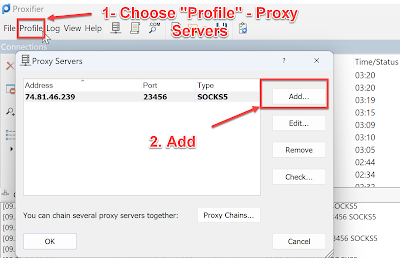
What is a SOCKS5 proxy? A SOCKS proxy is an additional feature that some VPN providers offer, allowing users to change their virtual location (also known as location spoofing). A SOCKS5 proxy lets you hide your IP address from online services. The SOCKS5 network protocol has enhanced security and offers three types of authentication methods: Null authentication – No authentication required to connect to a proxy. Username/password authentication – You need to provide login details to connect to a proxy. GSS-API authentication – Both you and the server use authentication methods at the operating system level to verify your identity. SOCKS operates on Layer 5 of the OSI model. Layer 5, also known as the session layer, acts as the intermediary layer between the presentation layer and the transport layer. Unlike SOCKS4, SOCKS5 supports UDP and TCP protocols, in addition to the SOCKS protocol. How to use SOCKS 5? Download Proxifier: https://www.proxifier.com/ Do as below instruction:
Access your iCloud.com Account from an Email Program using IMAP iCloud.com provides IMAP access to your iCloud.com account, so you can connect to your email from mobile devices and desktop email clients. iCloud.com supports IMAP / SMTP This means you don't have to use iCloud.com's webmail interface! You can check your email and send messages using other email programs (like Mailspring , Outlook Express, Apple Mail, or Mozilla Thunderbird). Using desktop email applications can improve your workflow. They typically offer more options, and your email is still available on your computer when you're disconnected from the internet. Setup Your iCloud.com Account with Your Email Program Using IMAP To access your iCloud.com email account from a desktop email program, you'll need the IMAP and SMTP settings below: iCloud.com IMAP Server imap.mail.me.com IMAP port 993 IMAP security SSL / TLS IMAP username Your full email address IMAP password Your iCloud.com password iCloud.com ...


Comments
Post a Comment